Unity’s Audio mixers


Unity has an object known as “Audio Mixer”. It allows us to have easy time manipulating audio on runtime, allowing us to create such things as audio volume settings or dynamicly mix layers of soundtracks.
In order to be able to manipulate Audio Mixers from script, we first need to expose our desired paramiter. First, we open the Audio mixer window by going to window > Audio > Audio Mixer

Then we select what we want to expose, and then right click on the value we want to expose to script.
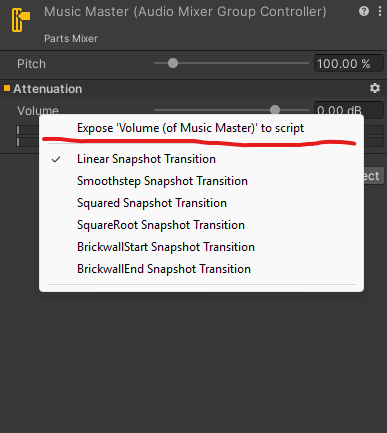
From there, we need to name our paramiter, so the script will know how it will look.

From there, you can access the paramiter from any script and modify it at any point at runtime.
Once you’ll select your audiomixer, you can apply new values from script using the SetFloat function.
[AUDIOMIXERREFERENCE].SetFloat("ParamiterName", [FLOAT_VALUE])Then, to all audio sourses mixer applies, you select it on your desired audioSource:
